
Elongated wooden cube labelled "Current topics" in blue. Next to it, further square wooden cubes with symbols. A biro on the right and a computer keyboard in the background.
This page has been automatically translated. There may therefore be discrepancies and inaccuracies in the text. Only the original version is binding. Legal claims arising from the content of the translated version are excluded.

AMEOS provides information on apprenticeships

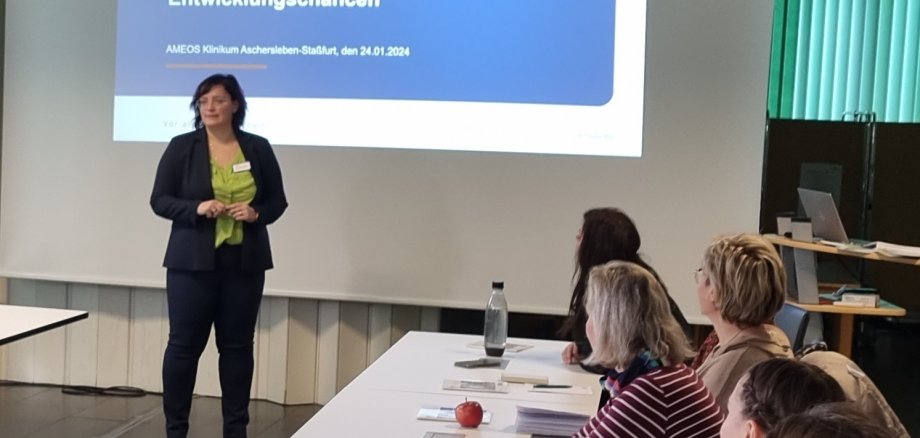
In mid-January, the AMEOS Region East gave the employees of the Salzlandkreis job centre an insight into the various training opportunities in the care sector as part of a career exploration day.

The group employs a total of 700 staff at its Aschersleben and Staßfurt sites and has a total of around 330 beds. Vivian Leitmann-Ehrler, Deputy Director of Nursing, presented the AMEOS Ost hospital group and the wide range of training programmes offered by the healthcare provider

In addition, Juliane Tabatzki, consultant for nursing training in Saxony-Anhalt, explained the requirements, content and general conditions of the 6 training professions at the hospital. The focus was on the new generalist nursing training programme introduced 4 years ago to become a qualified nurse. During the subsequent exchange of experiences, the particular professional challenges involved in implementing the cross-care training content were discussed.

During the two-hour event, the 22 employees from the job centre were able to ask questions about the various training professions and further development opportunities at the AMEOS Group. The aim of the clinic operator is to seamlessly take on the newly qualified specialists in permanent employment once they have successfully completed their training.

For the employees of the job centre, the careers day offered valuable enrichment for future advice to their customers on possible training courses and fields of work in the AMEOS Region East.

Help with accessibility

  • General

    We strive to make our websites accessible to all users. Details can be found in our accessibility statement. Please send any suggestions for improvement to jc-redaktion@jc.kreis-slk.de.

  • Font size

    To adjust the font size, please use the following key combinations:

    Larger

    command
    +

    Smaller

    command

    Larger

    Ctrl
    +

    Smaller

    Ctrl
  • Keyboard navigation

    Use TAB and SHIFT + TAB to navigate through next/previous links, form elements, and buttons.

    Use ENTER to open links and interact with elements.

  • Contrast mode

    Press the following key combination to reduce or increase the contrast:

    Enlarge

    control
    option
    command
    .

    Decrease

    control
    option
    command
    ,
    Note: The shortcuts must be activated in the system settings of the operating system.

    Press the left ALT key + left SHIFT key + PRINT to quickly turn high contrast mode on or off.

  • Invert colours

    Press the following key combination to switch the colour inversion on and off:

    control
    option
    command
    8
    Note: The shortcuts must be activated in the system settings of the operating system.

    First activate the screen magnifier and then switch the colour inversion on and off with the following key combinations:

    1. screen magnifier

    +

    2. invert colours

    Ctrl
    Old
    I
  • Screen magnifier

    Press the following key combinations to use the screen magnifier:

    Switch on/off

    option
    command
    8

    Enlarge view

    option
    command
    =

    Zoom out view

    option
    command
    Note: The shortcuts must be activated in the system settings of the operating system.

    Switch on / Enlarge view

    +

    Zoom out view