
Elongated wooden cube labelled "Current topics" in blue. Next to it, further square wooden cubes with symbols. A biro on the right and a computer keyboard in the background.
This page has been automatically translated. There may therefore be discrepancies and inaccuracies in the text. Only the original version is binding. Legal claims arising from the content of the translated version are excluded.

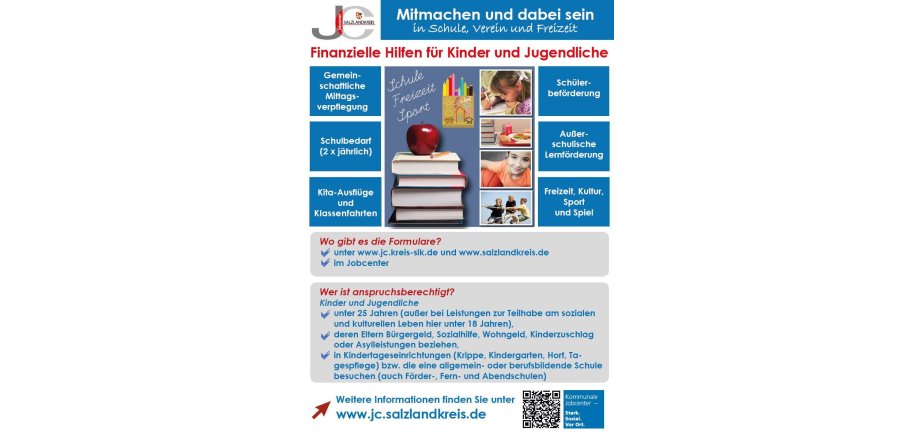
Free lunch at school and daycare centre

A balanced and regular diet supports concentration and performance. These are factors that play an important role in everyday school life and in daycare centres.

Although the hot lunch is the main meal of the day, many of the youngest children often do not eat lunch together due to the family's difficult financial situation.

In such cases, families in need are supported by the federal government's education and participation package. This means that if the daycare centre or school offers a regular, hot lunch, children and young people from families who receive unemployment benefit II, social assistance, child supplement or housing benefit or benefits under the Asylum Seekers Benefits Act can take advantage of a free lunch.

"It is advisable to claim the costs incurred for participation in the communal lunch service as soon as the relevant social benefit has been approved," explains Andreas Boennen, Head of the Integration Department at the Salzlandkreis Job Centre. As the costs are settled directly with the meal providers, the further procedure for covering the costs is very straightforward for the parents.

The employees of the Integration and Participation Department of the Salzlandkreis Job Centre advise parents and pupils on eligibility requirements, support options and application forms.

Further information on the education and participation package can be found on the Jobcentre's website at www.jc.salzlandkreis.de/leistungsberechtigte/bildung-und-teilhabe/.

Help with accessibility

  • General

    We strive to make our websites accessible to all users. Details can be found in our accessibility statement. Please send any suggestions for improvement to jc-redaktion@jc.kreis-slk.de.

  • Font size

    To adjust the font size, please use the following key combinations:

    Larger

    command
    +

    Smaller

    command

    Larger

    Ctrl
    +

    Smaller

    Ctrl
  • Keyboard navigation

    Use TAB and SHIFT + TAB to navigate through next/previous links, form elements, and buttons.

    Use ENTER to open links and interact with elements.

  • Contrast mode

    Press the following key combination to reduce or increase the contrast:

    Enlarge

    control
    option
    command
    .

    Decrease

    control
    option
    command
    ,
    Note: The shortcuts must be activated in the system settings of the operating system.

    Press the left ALT key + left SHIFT key + PRINT to quickly turn high contrast mode on or off.

  • Invert colours

    Press the following key combination to switch the colour inversion on and off:

    control
    option
    command
    8
    Note: The shortcuts must be activated in the system settings of the operating system.

    First activate the screen magnifier and then switch the colour inversion on and off with the following key combinations:

    1. screen magnifier

    +

    2. invert colours

    Ctrl
    Old
    I
  • Screen magnifier

    Press the following key combinations to use the screen magnifier:

    Switch on/off

    option
    command
    8

    Enlarge view

    option
    command
    =

    Zoom out view

    option
    command
    Note: The shortcuts must be activated in the system settings of the operating system.

    Switch on / Enlarge view

    +

    Zoom out view