Several office workers standing one behind the other.
This page has been automatically translated. There may therefore be discrepancies and inaccuracies in the text. Only the original version is binding. Legal claims arising from the content of the translated version are excluded.

Staßfurt location

Staßfurt location

Office hours


MondayBy appointment
Tuesday

By appointment, as
well as 9:00 a.m. to 12:00 p.m.
and 2:00 p.m. to 6:00 p.m.

Wednesday-----
Thursday

By appointment, as
well as 9:00 a.m. to 12:00 p.m.
and 2:00 p.m. to 4:00 p.m.

FridayBy appointment

Areas of responsibility Staßfurt

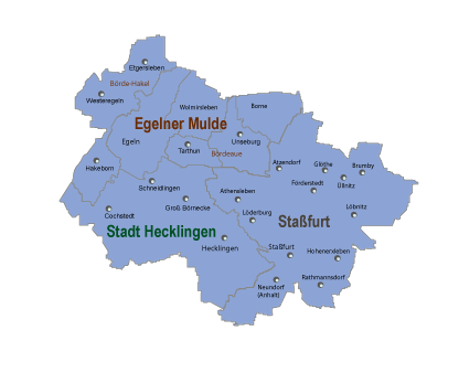
Map of the localities in the area of responsibility of the Staßfurt job centre

City of Staßfurt

Athensleben
district
Atzendorf district Brumby
district Förderstedt
district Glöthe
district Hohenerxleben
district
Löbnitz district
Löderburg district
Lust district Neu Staßfurt
district Neundorf (Anhalt)
district Rathmannsdorf
district Rothenförde
district Üllnitz district

VerbG Egelner Mulde

Municipality of Bördeaue (including Tarthun and Unseburg)
Municipality of Börde-Hakel
(including Etgerselben, Hakeborn and Westeregeln)
Municipality of
BorneTown of
EgelnMunicipality of Wolmirsleben

City of Hecklingen

Cochstedt
districtGroß Börnecke
districtSchneidlingen district

Help with accessibility

  • General

    We strive to make our websites accessible to all users. Details can be found in our accessibility statement. Please send any suggestions for improvement to jc-redaktion@jc.kreis-slk.de.

  • Font size

    To adjust the font size, please use the following key combinations:

    Larger

    command
    +

    Smaller

    command

    Larger

    Ctrl
    +

    Smaller

    Ctrl
  • Keyboard navigation

    Use TAB and SHIFT + TAB to navigate through next/previous links, form elements, and buttons.

    Use ENTER to open links and interact with elements.

  • Contrast mode

    Press the following key combination to reduce or increase the contrast:

    Enlarge

    control
    option
    command
    .

    Decrease

    control
    option
    command
    ,
    Note: The shortcuts must be activated in the system settings of the operating system.

    Press the left ALT key + left SHIFT key + PRINT to quickly turn high contrast mode on or off.

  • Invert colours

    Press the following key combination to switch the colour inversion on and off:

    control
    option
    command
    8
    Note: The shortcuts must be activated in the system settings of the operating system.

    First activate the screen magnifier and then switch the colour inversion on and off with the following key combinations:

    1. screen magnifier

    +

    2. invert colours

    Ctrl
    Old
    I
  • Screen magnifier

    Press the following key combinations to use the screen magnifier:

    Switch on/off

    option
    command
    8

    Enlarge view

    option
    command
    =

    Zoom out view

    option
    command
    Note: The shortcuts must be activated in the system settings of the operating system.

    Switch on / Enlarge view

    +

    Zoom out view